03 防火墙常见服务部署
在数字时代,网络安全成为企业至关重要的一环。而防火墙,则如同企业的坚实城墙,屏蔽潜在威胁,确保信息的安全流通。在部署防火墙时,关键的一步是选择和配置常见服务,这既包括访问控制、身份认证,又包括虚拟专用网络(VPN)等关键服务,为网络打造一道坚不可摧的安全屏障。
今天接着上一节继续完成今天的任务,在防火墙部署PPPoE服务。
实验需求
- 配置防火墙作为DHCP服务器端,PC1作为DHCP客户端
- 配置R1作为PPPOE服务端,FW1作为PPPOE客户端,地址获取155.1.121.12
配置步骤
- 在防火墙上使能DHCP功能,并使用接口模式配置DHCP服务。
bash
interface GigabitEthernet1/0/1
 undo shutdown
 ip address 10.1.12.254 255.255.255.0
 dhcp select interface
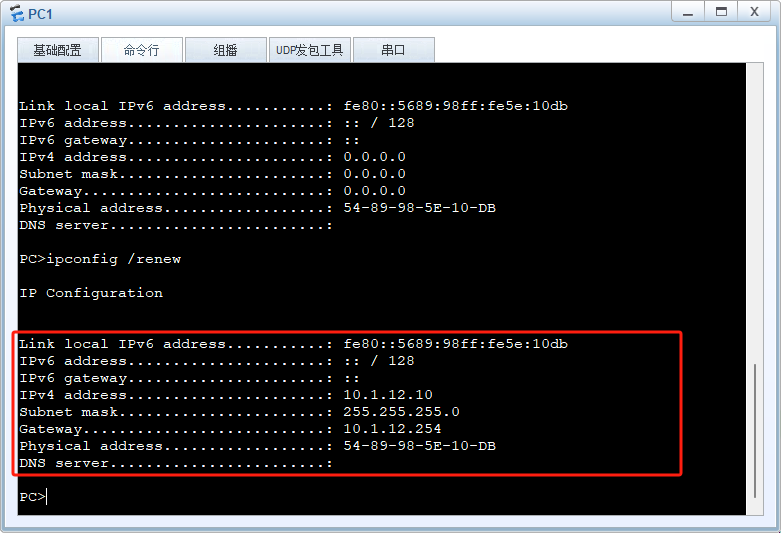
dhcp server static-bind ip-address 10.1.12.10 mac-address 5489-985e-10db接着我们在PC1上验证,DHCP的功能是否正常。如下图:
- 在防火墙上的出接口做拨号配置,关键配置如下:
bash
# 配置PPPOE客户端
interface Dialer1
 link-protocol ppp
 ppp chap user USER
 ppp chap password Huawei@123
 mtu 1492
 ip address ppp-negotiate
 dialer user Test
 dialer bundle 1
# 在物理接口上应用
interface GigabitEthernet1/0/0
 pppoe-client dial-bundle-number 1

# 把虚接口加安全区域
firewall zone untrust
 set priority 5
add interface Dialer1- 在路由器上配置PPPOE的服务端,关键配置如下:
bash
#配置物理接口IP地址
interface GigabitEthernet0/0/0
 ip address 155.1.121.11 255.255.255.0

# 创建PPPOE用户
aaa
 local-user user password cipher Huawei@123
 local-user user service-type ppp

# 创建虚模板
interface Virtual-Template1
 ppp authentication-mode chap
 remote address 155.1.121.12
 ip address unnumbered interface GigabitEthernet0/0/0

# 虚模板应用到物理接口上
interface GigabitEthernet0/0/0
 pppoe-server bind Virtual-Template 1
ip address 155.1.121.11 255.255.255.0- 在防火墙侧验证PPPOE是否启动成功,如下:
bash
[FW1-GigabitEthernet1/0/0]display pppoe-client session summary
2024-01-12 06:00:12.050
PPPoE Client Session:
ID   Bundle  Dialer  Intf             Client-MAC    Server-MAC    State
1    1       1       GE1/0/0          00e0fc236cff  00e0fcc36ddd  PPPUP

[FW1-GigabitEthernet1/0/0]display ip interface brief
2024-01-12 06:00:38.880
*down: administratively down
^down: standby
(l): loopback
(s): spoofing
(d): Dampening Suppressed
(E): E-Trunk down
The number of interface that is UP in Physical is 7
The number of interface that is DOWN in Physical is 4
The number of interface that is UP in Protocol is 6
The number of interface that is DOWN in Protocol is 5

Interface                         IP Address/Mask      Physical   Protocol
Dialer1 155.1.121.12/32 up up(s)5.为了防火墙内网用户能正常联网,需要在防火墙上添加一条默认路由,如下:
bash
ip route-static 0.0.0.0 0.0.0.0 Dialer1好了,今天的内容就分享到这里。谢谢!